News
LCD Power Consumption Explained: Low-Power vs. Standard Displays from 10.1 to 32 Inch
 LCD Power Consumption Explained: Low-Power vs. Standard Displays from 10.1 to 32 Inch
How Brightness, LED Backlighting, and Display Design Affect Energy Consumption
“Your 10.1-inch LCD module—how many watts does it consume?”
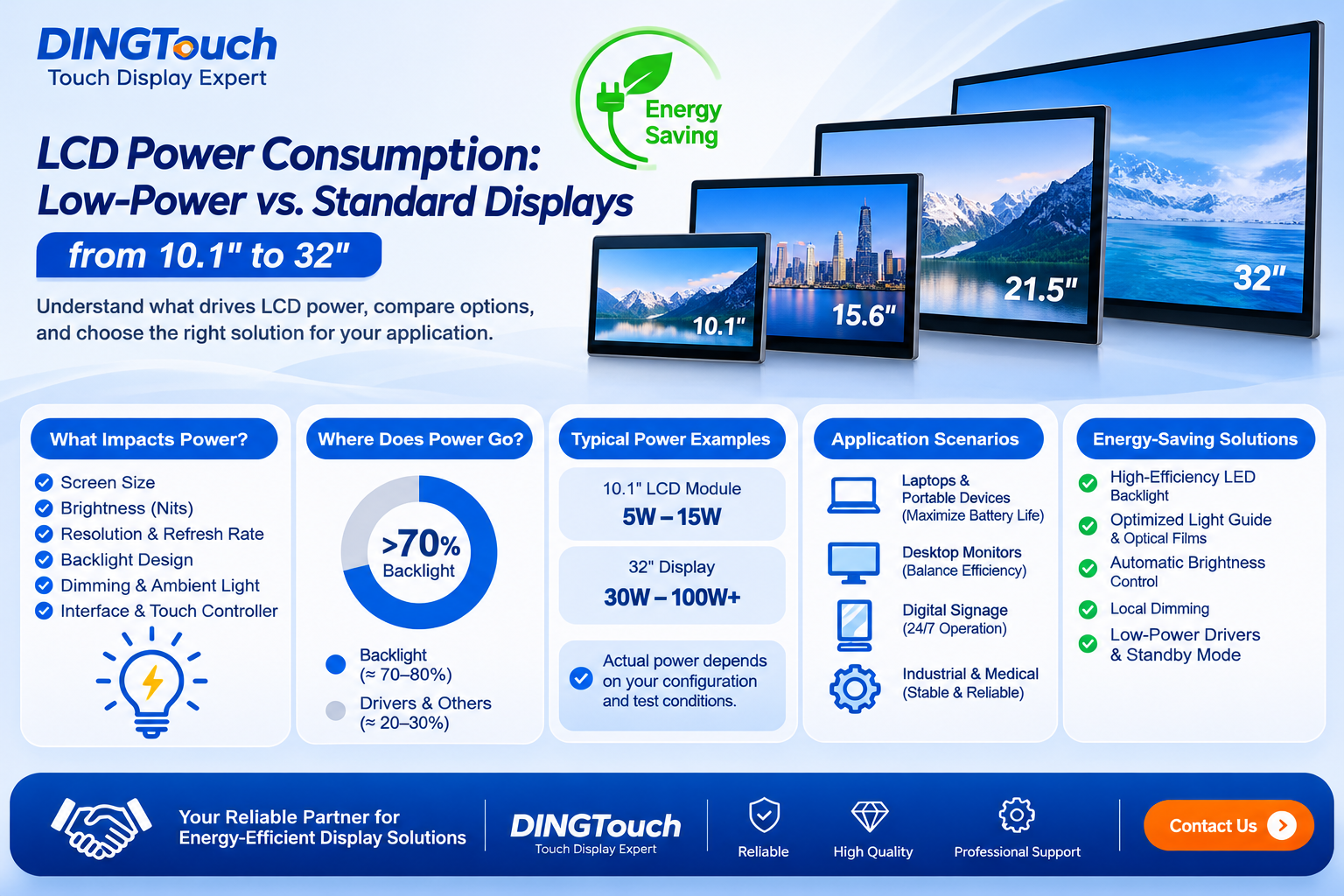
The answer depends on more than screen size. Brightness, resolution, LED backlight efficiency, display architecture, driver circuitry, and power management all influence total power consumption.
For example, a 10.1-inch LCD module may consume around 5W in one configuration and approach 15W in another. A 32-inch standard-brightness display may consume approximately 30W, while a high-brightness configuration can exceed 100W, depending on its design and operating conditions.
These figures are illustrative rather than universal specifications. Actual power consumption must be verified against the module's brightness, operating mode, and test conditions.
So, why can two LCD modules of the same size consume significantly different amounts of power?
For OEM manufacturers developing industrial equipment, medical devices, outdoor kiosks, digital signage, and embedded terminals, the answer directly affects battery life, electricity costs, thermal management, and overall product reliability.
At DINGTouch, we develop customized touch screen and display solutions for industrial and commercial applications. Understanding power consumption is an important part of selecting the right display—not simply choosing the lowest-wattage module available.
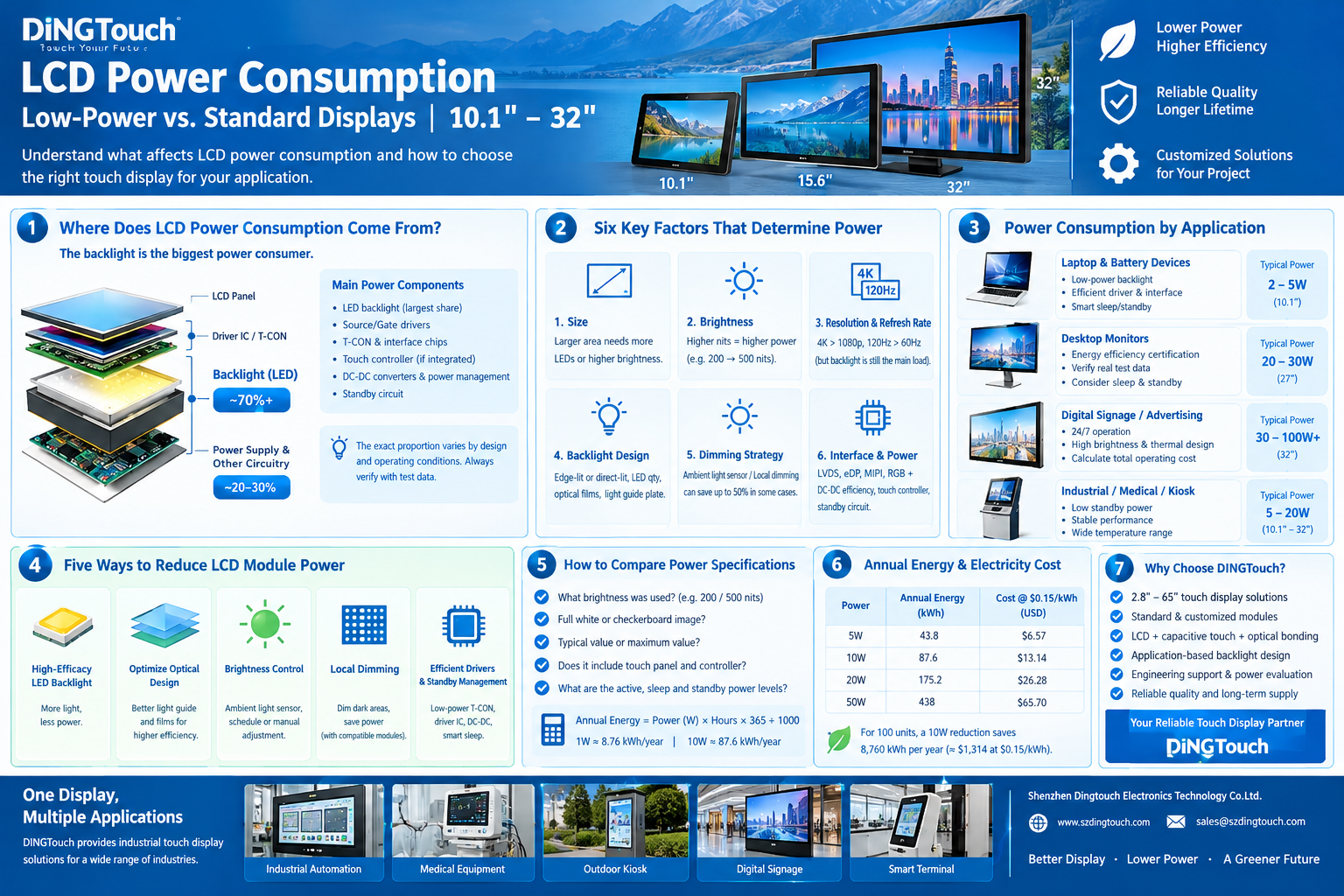
1. Where Does LCD Power Consumption Come From?
An LCD is not a self-emissive display. Unlike OLED technology, an LCD requires a backlight to illuminate its pixels. Consequently, the backlight is often the largest contributor to total power consumption.
1.1 LED Backlighting: The Main Power Consumer
The LED backlight provides the illumination that passes through the LCD panel. Its power consumption depends on several factors:
-
Required screen brightness, measured in nits or cd/m²
-
LED luminous efficacy and operating current
-
Number and arrangement of LED
-
Light guide plate and optical film efficiency
-
Backlight driver efficiency
-
Brightness control and dimming strategy
In many conventional LCD modules, the backlight accounts for a substantial proportion of total power consumption. For high-brightness displays, its share can be particularly significant.
However, the exact proportion varies by module design and operating conditions. It should be measured rather than assumed.
1.2 Driver IC, Timing Controllers, and Power Conversion
The remaining power is consumed by the display electronics, including:
-
Source and gate drivers
-
Timing controller (T-CON), where applicable
-
Interface and control circuitry
-
Touch controller, if integrated
-
DC-DC converters and voltage regulation
-
Standby and power-management circuits
The touch screen also contributes to system power consumption. A projected capacitive touch controller may have different power requirements depending on its scanning frequency, operating mode, sensing configuration, and controller design.
For battery-powered devices, these seemingly small loads can become important, especially during standby or low-brightness operation.
The key takeaway: If the objective is to reduce LCD power consumption, start by evaluating the backlight. Then optimize the display electronics, touch controller, and power-management architecture.
2. Six Factors That Determine LCD Module Power Consumption
Two displays with identical dimensions can have very different power requirements. The following six factors should be considered during the selection process.
2.1 Screen Size and Active Display Area
Larger displays generally require more backlight power to achieve the same brightness across a larger active area.
For example, a 10.1-inch display and a 32-inch display have significantly different illumination requirements. However, power does not increase in a simple linear relationship with diagonal size because aspect ratio, panel transmission, optical design, and backlight architecture also matter.
When comparing modules, evaluate power consumption at the same measured screen brightness—not simply the same nominal size.
2.2 Brightness: One of the Biggest Variables
Brightness is one of the most important factors affecting LCD power consumption.
A display designed for 200 nits of indoor operation may require considerably less backlight power than a 500-nit industrial display or a 1,000-nit outdoor display.
However, doubling the brightness does not necessarily double the power consumption. The relationship depends on LED efficiency, optical losses, driver behavior, and the panel's light transmission.
For industrial equipment, the objective should be to specify the minimum brightness that reliably meets the application requirements.
-
Indoor control panels may prioritize moderate brightness and energy efficiency.
-
Outdoor kiosks may require high brightness to remain readable in sunlight.
-
Marine and transportation equipment may need brightness control across changing ambient conditions.
-
Medical and industrial terminals may prioritize consistent readability and stable long-term operation.
Choosing a high-brightness display when the application does not need one can increase power consumption, heat generation, and system cost unnecessarily.
2.3 Resolution and Refresh Rate
Resolution and refresh rate influence display-processing and interface power consumption.
A 4K display may require more processing and data transmission than a comparable 1080p display. A 120Hz panel may also consume more power than a 60Hz panel, depending on the panel technology and operating mode.
However, these relationships are not universal. Panel architecture, timing settings, interface implementation, and image content can all affect the result.
For many LCD applications, the backlight remains a major power consumer. Therefore, reducing resolution solely to save energy may be less effective than optimizing brightness and backlight efficiency.
The better approach is to select a resolution and refresh rate that satisfy the application's functional requirements without introducing unnecessary complexity.
2.4 Backlight Architecture and Optical Efficiency
The backlight system has a direct influence on the relationship between electrical power and visible brightness.
Important design considerations include:
-
Edge-lit or direct-lit backlight architecture
-
LED luminous efficacy and operating current
-
Light guide plate design and extraction efficiency
-
Diffuser and brightness-enhancement films
-
Uniformity requirements
-
Backlight driver efficiency
A more efficient optical system can deliver the required screen brightness with less electrical input.
For customized display projects, this is an important area for collaboration between the LCD module supplier and the equipment manufacturer.
2.5 Dimming and Ambient-Light Control
A display does not always need to operate at maximum brightness.
Automatic brightness control uses an ambient-light sensor to adjust brightness according to surrounding conditions. For example, an indoor kiosk can reduce brightness at night, while an outdoor terminal can increase it when sunlight becomes stronger.
The resulting energy savings depend on the environment, brightness settings, operating schedule, and sensor-control algorithm. A 50% reduction is possible in some operating scenarios, but it should not be treated as a guaranteed result.
Local dimming is another approach. It controls separate backlight zones independently and can reduce illumination in darker image areas.
However, local dimming is not available on every LCD module. It requires a compatible backlight architecture and control system, and its effectiveness depends on image content. For some industrial displays, optimized global brightness control may provide a better balance of cost, complexity, and energy efficiency.
2.6 Interface, Power Supply, and Touch Controller
Display interfaces such as LVDS, eDP, MIPI DSI, and RGB have different electrical and system-level requirements. Their power consumption depends on data rate, lane configuration, voltage levels, implementation, and connected hardware.
The power supply also matters. An inefficient DC-DC converter generates additional heat and wastes energy before power reaches the display.
For touch-enabled displays, consider the touch controller's operating and standby power, particularly when the equipment uses a battery or remains powered continuously.
The most useful measurement is not the interface specification alone, but the power consumed by the complete display assembly under defined operating conditions.
3. Low-Power LCD Selection for Four Application Scenarios
A low-power display should be selected according to the actual operating environment. Different applications have different priorities.
3.1 Laptop and Battery-Powered Devices: Maximize Runtime
For portable devices, display power consumption directly affects battery runtime and thermal performance.
Selection priorities include:
-
Efficient LED backlighting
-
Appropriate brightness for the intended environment
-
Low-power panel and driver design
-
Efficient interface and power conversion
-
Effective sleep and standby management
A display that consumes an additional watt may have a noticeable impact on battery life, depending on battery capacity and the power consumption of the rest of the system.
OEM engineers should evaluate power consumption at multiple brightness levels and include both active and low-power operating modes in their measurements.
3.2 Desktop Monitors: Optimize Daily Energy Efficiency
For desktop monitors, power consumption during normal operation, sleep, and standby should all be considered.
The actual power requirement depends on screen size, resolution, refresh rate, brightness, and additional features.
When developing products for Europe and North America, manufacturers should verify the applicable energy-efficiency requirements and certification criteria for the finished product. ENERGY STAR and relevant European ecodesign requirements may be applicable depending on product category, market, and product configuration.
A display module's power specification alone does not establish that the finished monitor complies with these requirements.
3.3 Digital Signage and Advertising Displays: Calculate Total Operating Cost
Digital signage often operates for extended periods, making small differences in power consumption financially significant.
Consider two displays operating continuously, 24 hours per day, for 365 days.
| Average power difference | Annual energy difference per unit |
|---|---|
| 5W | 43.8 kWh |
| 10W | 87.6 kWh |
| 20W | 175.2 kWh |
| 50W | 438 kWh |
For 100 devices, a 10W reduction saves approximately 8,760 kWh per year, assuming continuous operation and an actual average power reduction of 10W.
The annual electricity cost can then be calculated using the local electricity tariff.
High brightness may be essential for outdoor signage, but high brightness does not automatically mean inefficient operation. A carefully designed LED backlight, effective optical films, and automatic brightness control can help balance visibility and energy consumption.
Thermal management should also be considered. Lower electrical power generally reduces the heat that must be dissipated, although the final thermal design depends on the complete enclosure and system architecture.
3.4 Industrial, Medical, and Self-Service Terminals: Balance Power and Reliability
Industrial HMIs, medical terminals, vending machines, and self-service kiosks often display static information for extended periods.
In these applications, the design priorities may include:
-
Low standby power
-
Stable display performance
-
Appropriate industrial temperature range
-
Efficient power conversion
-
Reliable brightness control
-
Touch controller power management
-
Long-term component availability
For touch-enabled terminals, the display and touch system must be evaluated together. A screen that saves power but fails to meet readability, environmental, or touch-performance requirements is not a suitable solution.
The goal is to reduce unnecessary energy consumption without compromising the reliability of the finished product.
4. Five Ways to Reduce LCD Module Power Consumption
For OEM projects, power optimization should begin during display selection and system design rather than after the product has entered production.
4.1 Select High-Efficacy LED Backlighting
LED efficacy affects how much visible light can be produced from a given electrical input.
A carefully selected LED system can achieve the required brightness with lower backlight power. The design must also account for uniformity, thermal conditions, aging, and the desired operating lifetime.
4.2 Optimize the Light Guide Plate and Optical Films
The light guide plate, diffuser, and brightness-enhancement films determine how efficiently light is distributed and directed toward the viewer.
An optimized optical stack can improve brightness uniformity and reduce optical losses. This may allow the backlight to operate at a lower power level while maintaining the required visible brightness.
The benefits depend on the panel and backlight design, so comparative testing is essential.
4.3 Implement Appropriate Brightness Control
Not every application requires maximum brightness throughout the day.
Depending on the product, engineers can consider manual brightness adjustment, scheduled brightness profiles, or ambient-light sensing.
For example, a self-service terminal in a shopping center may operate at a lower brightness overnight, while an outdoor kiosk may require a much higher level during daylight.
Brightness control is often a practical way to reduce average operating power without changing the LCD panel itself.
4.4 Evaluate Local Dimming Where Appropriate
For applications with compatible backlight hardware, local dimming can reduce power when portions of the image are dark.
However, it adds design complexity and may not provide meaningful savings for every image or application. It should be evaluated against the display's image characteristics, cost targets, and control requirements.
For many conventional industrial touch displays, efficient backlighting and well-designed global brightness control may be more appropriate.
4.5 Optimize Driver Electronics and Standby Management
Power optimization should include the complete electrical path:
-
LCD timing and driver circuitry
-
Backlight driver
-
DC-DC conversion
-
Touch controller
-
Host interface
-
Sleep and standby functions
The design should define which circuits remain active when the display is idle and which can enter a lower-power state.
For a battery-powered device, this may be essential to achieving the target runtime. For a continuously operating terminal, reducing average active power may have a greater effect on annual energy consumption.
5. How to Compare LCD Power Specifications Accurately
A specification such as “20W typical power consumption” is not sufficient for a meaningful comparison unless the test conditions are clearly defined.
Before choosing a display module, ask the supplier the following questions.
5.1 What Brightness Was Used for Testing?
A display measured at 200 nits cannot be directly compared with one measured at 500 nits.
Ask for power measurements at the brightness levels relevant to the finished product.
5.2 Was the Measurement Taken With a Full-White Image?
Image content can influence power consumption, especially in systems with local dimming or content-dependent power behavior.
For a conventional LCD with a fixed backlight setting, image content may have a smaller effect than brightness. Nevertheless, the test pattern should be documented for repeatability.
5.3 Is the Figure Typical, Maximum, or Measured Power?
Typical power describes a representative operating condition. Maximum power may account for higher-load operating conditions, depending on the supplier's definition.
For system power-supply sizing, engineers should consider maximum expected load and startup behavior, not only the typical value.
5.4 Does the Figure Include the Touch Panel and Controller?
Some suppliers specify the LCD panel alone. Others provide figures for a complete display assembly.
A useful comparison should identify whether the measurement includes:
-
LCD panel and backlight
-
Touch panel and touch controller
-
Driver or interface board
-
Power-conversion circuitry
For HDMI display assemblies, for example, the interface board can add power consumption beyond that of the LCD module itself.
5.5 What Are the Active, Sleep, and Standby Power Levels?
These values are particularly important for portable and continuously connected equipment.
Ask for a clearly defined measurement of active power, sleep power, and standby power, where those modes are supported.
A documented test report is more useful than an isolated wattage figure because it allows the engineering team to compare modules under equivalent conditions.
6. Calculate Annual LCD Energy Consumption and Electricity Cost
A simple formula can help estimate the operating cost of a display.
Annual energy consumption:
Annual energy (kWh) = Power (W) × Operating hours per day × Operating days per year ÷ 1,000
For continuous operation throughout the year:
1W × 24 hours × 365 days ÷ 1,000 = 8.76 kWh
Therefore:
-
5W consumes 43.8 kWh per year.
-
10W consumes 87.6 kWh per year.
-
20W consumes 175.2 kWh per year.
-
50W consumes 438 kWh per year.
These figures represent the energy attributable to the stated power load, not necessarily the entire device.
To estimate electricity cost:
Annual electricity cost = Annual energy consumption × Electricity tariff per kWh
For example, if a display assembly saves 10W during continuous operation, the annual energy saving is 87.6 kWh per unit. Multiply this by the local electricity tariff and the number of deployed units to estimate the financial benefit.
For large installations, also evaluate the effects on power supplies, cooling, and thermal design. Those system-level savings depend on the complete equipment configuration and should be calculated separately.
 7. How DINGTouch Supports Low-Power Touch Display Projects
DINGTouch is an Industrial touch screen and display manufacturer providing customized display solutions for OEM and ODM applications.
Our product range covers approximately 2.8-inch to 65-inch touch screen and display solutions, depending on the required configuration and application.
For projects involving low-power LCD modules, high-brightness displays, or integrated touch displays, we focus on matching the display architecture to the real operating requirements.
7.1 Select the Right Display Before Developing a Custom Solution
Not every project needs a fully customized LCD module.
Where a suitable standard display meets the required dimensions, brightness, resolution, interface, and environmental conditions, a standard module may reduce development time and avoid unnecessary tooling costs.
For applications requiring special brightness, cover glass, touch performance, or mechanical integration, we can evaluate the customization requirements.
7.2 Match the Backlight to the Application
The right backlight depends on where and how the equipment will operate.
-
Battery-powered equipment: prioritize power efficiency and brightness control.
-
Indoor industrial terminals: balance readability, power, and cost.
-
Outdoor kiosks: evaluate high brightness, optical efficiency, and thermal management.
-
Medical and specialized equipment: consider readability, operating conditions, reliability, and system requirements together.
A low-power design must still meet the application's brightness, lifetime, and environmental targets.
7.3 Integrate LCD, Capacitive Touch, and Optical Bonding
A touch display is more than an LCD panel.
Depending on project requirements, DINGTouch can support the integration of LCD modules, projected capacitive touch panels, customized cover glass, and optical bonding.
These choices influence optical performance, mechanical structure, touch behavior, and thermal design. The final configuration should therefore be assessed as a complete assembly rather than as separate components.
7.4 Provide Engineering-Oriented Power Evaluation
For an accurate comparison, we recommend defining the following information before selecting a module:
-
Screen size and resolution
-
Required brightness
-
Interface, such as LVDS, eDP, MIPI DSI, RGB, or HDMI
-
Touch requirements
-
Operating temperature
-
Daily operating hours
-
Active, sleep, and standby requirements
-
Available power supply and thermal constraints
Based on the project requirements and available measurement data, the engineering team can evaluate suitable module options and identify the conditions under which power consumption should be verified.
8. Frequently Asked Questions About LCD Power Consumption
Q1. How many watts does a 10.1-inch LCD module consume?
There is no single value for all 10.1-inch LCD modules. Power consumption depends on brightness, panel technology, backlight design, driver circuitry, and whether a touch panel or interface board is included. A representative module may consume several watts, while a high-brightness configuration can require substantially more. Always confirm the actual specification and test conditions.
Q2. Why does a high-brightness LCD consume more power?
Higher brightness generally requires more light output from the backlight. Unless the optical system and LED are sufficiently efficient, increasing brightness raises electrical power consumption and heat generation.
Q3. Can a high-brightness LCD also be energy-efficient?
Yes. High brightness and high power consumption are not synonymous. LED efficacy, optical design, backlight control, and power-conversion efficiency all affect the result. However, the required brightness must be achieved under the specified operating conditions.
Q4. Does a touch screen consume significantly more power than a non-touch LCD?
The touch panel and controller add power consumption, but the amount depends on the sensing technology, controller, scan settings, and operating mode. In many applications, the backlight remains the dominant load. The complete touch display assembly should be measured for an accurate comparison.
Q5. Does a higher resolution always mean higher power consumption?
No. Higher resolution can increase interface and display-driving requirements, but actual power consumption depends on the panel architecture, brightness, refresh rate, and electronics. It should be evaluated alongside backlight power rather than used as the sole indicator.
Q6. What information should I provide when requesting a low-power display solution?
Provide the screen size, resolution, brightness, interface, touch requirements, operating temperature, application environment, and available power budget. If the equipment is battery-powered or operates continuously, also specify the expected operating schedule and standby requirements.
Conclusion: Choose an LCD Module Based on Total Operating Requirements
How much power does an LCD consume? The answer depends on the complete display design and how the device is used.
For most projects, the right selection process begins with the required brightness, backlight efficiency, and operating conditions. Interface power, touch-controller consumption, power conversion, and standby management should then be evaluated as part of the complete assembly.
The lowest-wattage module is not automatically the best choice. The ideal solution balances energy efficiency with readability, reliability, operating lifetime, integration cost, and application requirements.
DINGTouch helps OEM customers evaluate industrial touch screen and display solutions for applications ranging from embedded terminals to high-brightness commercial equipment.
Planning a low-power LCD or touch display project?
Contact DINGTouch with your required screen size, brightness, resolution, interface, and application details. We can help you evaluate suitable standard modules or customized touch display configurations based on your engineering requirements.
CATEGORIES
CONTACT US
Contact: Dingtouch
Phone: +8615815536116
Tel: +8615815536116
Email: sales@szdingtouch.com
Add: Building A, Bailu Plaza, No. 48, Gonghe Industrial Road, Gongle Community, Xixiang Street, Baoan District, Shenzhen,China. 518126
 Dingtouch