News
How to Choose an LCD for Medical Devices? Key Parameters for Medical Displays
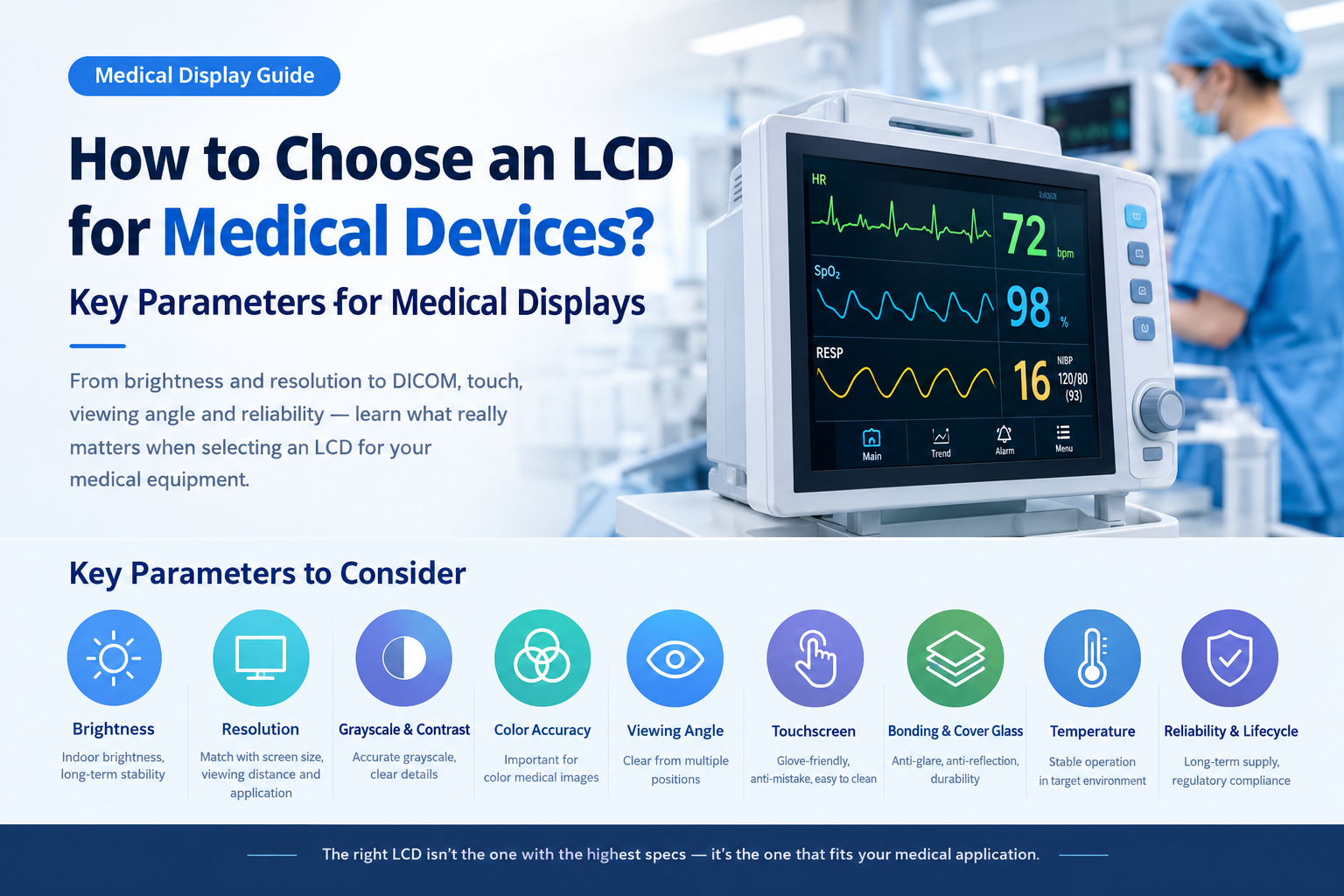 How to Choose an LCD for Medical Devices? Key Parameters for Medical Displays
Choosing the right LCD display for medical equipment can be more complicated than simply finding a product labeled “Medical LCD” and comparing screen size, resolution, and brightness.
In reality, medical display applications are not all the same.
Patient monitors, infusion pumps, ventilators, blood analyzers, PCR systems, ultrasound equipment, endoscopy systems, medical imaging workstations, and medical HMI terminals can have very different display requirements.
An LCD that can be used in one medical device does not necessarily meet the requirements of another. Likewise, an industrial-grade LCD without the word “Medical” in its product name is not automatically unsuitable for medical equipment.
A more practical selection process is:
Define the display application → determine the required display performance → evaluate touch, optical bonding, structure, and interfaces → then assess lifecycle, supply stability, and medical device compliance.
The first question to ask is:
Is the display mainly used for equipment operation and information, or does it directly support medical image observation and diagnosis?
This distinction has a major impact on the LCD specifications required.
1. Start by Defining What the LCD Is Used For
Medical displays can generally be divided into two major application categories.
Medical HMI and Equipment Information Display
In this type of application, the LCD mainly displays:
- Numerical data
- ECG and other waveforms
- Alarm information
- Menus
- Control buttons
- Measurement results
- Equipment status
- Test results
Typical applications include:
- Patient monitors
- Infusion pumps
- Ventilators
- Blood analyzers
- PCR equipment
- Laboratory instruments
- Medical control terminals
These applications generally prioritize:
Readability, viewing angle, touch performance, reliability, interface compatibility, operating temperature, and long-term availability.
They do not necessarily require the complete grayscale calibration system used in professional diagnostic displays.
Medical Imaging Display
The second category includes displays that are directly used to view medical images, such as:
- X-ray / DR
- CT
- MRI
- Mammography
- Digital pathology
- Endoscopy
- Medical imaging workstations
These applications require a higher level of display performance.
In addition to resolution and brightness, engineers may need to consider:
- Grayscale performance
- Brightness stability
- Luminance uniformity
- Contrast
- Color accuracy
- Pixel density
- DICOM display characteristics
- Calibration
- Long-term quality control
Therefore, medical HMI LCDs and diagnostic medical displays should not be evaluated using exactly the same criteria.
2. The First Key Question: Does the Display Support Diagnosis?
This is one of the most important questions to clarify at the beginning of a medical display project.
If the LCD is mainly used to display heart rate, blood pressure, temperature, menus, alarms, and operating controls, the priorities are usually:
Clear visibility, stable operation, easy interaction, and reliability.
If the LCD is used for X-ray, CT, MRI, or other medical images, additional requirements may apply, including:
Accurate grayscale reproduction, luminance stability, uniformity, and DICOM-related performance.
Therefore, during project definition, ask:
Will the displayed information be used for medical diagnosis or clinical decision-making?
If the answer is yes, the LCD should not be selected solely according to standard industrial HMI requirements.
If the answer is no, there is usually no need to apply every requirement of a professional diagnostic display simply because the application is “medical.”
3. How Bright Should a Medical LCD Be?
Brightness is one of the most visible specifications on an LCD datasheet, but higher brightness does not automatically mean better medical display performance.
Most hospital wards, laboratories, examination rooms, and medical equipment operate indoors. Therefore, many medical HMI applications do not require the 1000-nit or higher brightness levels commonly found in outdoor industrial displays.
For patient monitors, testing equipment, and laboratory instruments, brightness should primarily provide:
- Clear readability under indoor lighting
- Easy-to-read numerical information
- Clear waveform visibility
- Easy recognition of alarm information
- Sufficient visibility after adding a touch panel or cover glass
If the LCD is integrated with:
- Cover Glass
- PCAP Touch
- Protective Glass
- Optical Bonding
the complete optical stack should also be evaluated because each additional layer can affect transmission and reflection.
Brightness Stability Matters Too
LCD backlights gradually lose brightness over time, while temperature can also affect display performance.
For ordinary HMI applications, this change may have limited impact.
For medical imaging, however, significant luminance drift can affect image consistency over time.
Professional diagnostic displays therefore focus not only on peak brightness but also on:
Whether the calibrated operating brightness can remain stable over the service life of the display.
This is why professional diagnostic displays may incorporate sensors, automatic calibration, and quality-control systems instead of relying only on a factory brightness adjustment.
4. Why Is DICOM Part 14 Important for Medical Imaging?
If a project involves X-ray, CT, MRI, or other medical grayscale images, DICOM Part 14 becomes an important consideration.
DICOM PS3.14 defines the Grayscale Standard Display Function (GSDF).
Its purpose is not simply to determine whether a display is bright enough. Instead, it defines a relationship between digital pixel values and displayed luminance so that grayscale differences in medical images can be presented in a controlled and consistent way.
In simple terms:
Medical imaging displays are not only about brightness. They are also about whether subtle differences between grayscale levels can be reproduced consistently.
For example, two areas in a medical image may have very similar grayscale values. If the display's gamma, luminance, or grayscale performance is unstable, subtle image differences may become more difficult to observe.
Professional diagnostic displays may therefore combine:
- DICOM GSDF
- Grayscale calibration
- Luminance calibration
- Built-in sensors
- Periodic quality control
to maintain consistent display performance.
However, one important point should be emphasized:
Not every medical LCD needs DICOM support.
If the display only shows:
- Heart rate
- Blood pressure
- Temperature
- Menus
- Alarms
- Control buttons
there is usually no reason to apply the full requirements of a diagnostic imaging display.
DICOM-related requirements are mainly relevant to medical image observation and diagnostic applications.
5. How Should You Choose the Resolution of a Medical LCD?
For medical equipment, higher resolution is not automatically better.
A more practical approach is to consider:
Screen size + viewing distance + display content + software UI + host system output capability.
For example, different resolutions may be appropriate for:
- 7-inch medical HMIs
- 8.4-inch medical displays
- 10.4-inch medical equipment
- 12.1-inch industrial medical terminals
- 15.6-inch medical devices
For patient monitors, laboratory instruments, and equipment control applications, resolutions such as 800×600 or 1024×768 can still be practical in certain designs.
For displays 15.6 inches and larger, 1920×1080 or higher may be more appropriate when multiple windows, waveforms, and data panels need to be displayed simultaneously.
Resolution Is Especially Important for Replacement Projects
When replacing an LCD in an existing medical device, do not automatically assume:
“The original display is 1024×768, so replacing it with 1920×1080 must be better.”
A resolution change may affect:
- Host board output
- BIOS
- Display drivers
- Operating system scaling
- User interface layout
- Font size
- Software compatibility
- FPC and interface definitions
For medical equipment replacement projects, system compatibility can sometimes be more important than increasing resolution.
6. Contrast and Grayscale Can Matter More Than “Vivid Colors”
Consumer displays often emphasize:
- Wide color gamut
- Vivid colors
- High refresh rates
Medical displays have different priorities depending on the application.
For patient monitors, ECG waveforms, numerical values, and alarm information need to be:
- Clear
- Easy to read
- High enough in contrast
- Comfortable for extended viewing
For medical grayscale imaging, the focus shifts toward:
- Dark-area details
- Grayscale transitions
- Contrast
- Luminance stability
- Uniformity
For endoscopy, pathology, and other color medical imaging applications, additional parameters may include:
- Color gamut
- White point
- Color accuracy
- Color consistency
- Color calibration
Therefore, medical LCD display parameters should always be selected according to the actual content.
A simple way to understand the priorities is:
Medical HMI → clarity and readability
Grayscale medical imaging → grayscale, luminance, and uniformity
Color medical imaging → color accuracy and calibration
7. Why Are Wide Viewing Angles Important for Medical Equipment?
Medical displays are not always viewed directly by a single person.
For example:
- Patient monitoring equipment
- Operating-room equipment
- Mobile medical equipment
- Cart-based medical systems
- Laboratory instruments
may be viewed by doctors, nurses, or technicians from different positions.
With a narrow viewing angle, viewing the LCD from the side can cause:
- Reduced brightness
- Contrast changes
- Color shift
- Grayscale changes
- Image inversion on certain panel technologies
For this reason, IPS, AHVA, and other wide-viewing-angle display technologies are often suitable for medical equipment.
However, the “178° viewing angle” listed on a datasheet does not tell the whole story.
The more important question is:
How does the display perform from the actual viewing positions in the finished medical device?
The project team should check:
- Whether alarm colors remain recognizable
- Whether waveforms remain clear
- Whether grayscale changes significantly
- Whether black levels change
- Whether color shift becomes noticeable
Testing the LCD in the actual device enclosure and viewing environment is therefore strongly recommended.
8. Why Does Luminance Uniformity Matter?
When selecting an industrial LCD, buyers often focus on:
- Size
- Resolution
- Brightness
- Interface
- Temperature range
But for medical imaging, luminance uniformity can also be an important parameter.
The LCD panel and backlight system may have some regional variation, such as:
- A brighter center
- Slightly darker edges
- Local luminance differences
For menus, buttons, and numerical information, these differences may have little practical impact.
For large medical grayscale images, however, display non-uniformity can interfere with image observation.
Professional diagnostic displays may therefore use luminance and chromaticity compensation technologies together with sensors and quality-control systems to maintain display consistency.
This highlights an important distinction:
A high-specification LCD panel is not automatically equivalent to a professional diagnostic display.
Diagnostic display performance can depend on the combined system of:
LCD panel + driver electronics + backlight + calibration + sensors + software quality control
9. How Should You Choose a Medical touchscreen?
More medical devices now use touch interfaces, so LCD selection often needs to be considered together with PCAP touch technology.
For new product designs, PCAP touchscreens offer several advantages:
- Flat front surface
- Easier cleaning
- Multi-touch capability
- Gesture support
- Full cover glass options
- Modern HMI experience
However, medical touch applications require more than simply specifying “10-point touch.”
Glove Touch Performance
Medical personnel may operate equipment while wearing gloves.
Thin medical gloves can often be supported through PCAP tuning, but actual performance depends on:
- Glove material
- Glove thickness
- Touch controller
- Sensor design
- System tuning
The best approach is to test with the actual gloves used in the target application.
Water and Liquid Rejection
Medical equipment surfaces may come into contact with:
- Water droplets
- Disinfectants
- Cleaning fluids
If the PCAP system has insufficient water rejection or noise immunity, false touches or touch instability may occur.
Relevant requirements may include:
Glove Touch + Water Rejection + Noise Immunity
Disinfectant Compatibility
Medical devices are frequently cleaned and disinfected.
Therefore, not only the touch sensor but also the complete front structure should be evaluated, including:
- Cover Glass
- Printing ink
- OCA
- Surface coating
- Adhesives
- Protective layers
The key questions are:
Can the touchscreen be operated with gloves? Can it reject false touches when liquid is present? Will repeated cleaning or disinfection degrade the materials over time?
10. How Do Cover Glass, Surface Treatment, and Bonding Affect Medical Displays?
Medical equipment is frequently cleaned, making the front cover and surface treatment important design considerations.
In environments with strong ambient lighting, reflections from the display surface can reduce readability.
Depending on the application, designers may consider:
AG — Anti-Glare
Helps reduce glare and diffuse reflections, improving readability under challenging lighting conditions.
AR — Anti-Reflection
Helps reduce surface reflections and improve perceived image clarity.
AF — Anti-Fingerprint
Helps reduce fingerprints and oil contamination, which can be particularly useful for touchscreen equipment.
These treatments can also be combined depending on the project requirements.
11. Frame Bonding or Optical Bonding for Medical LCD?
When a touchscreen is integrated with an LCD, the bonding method also needs to be considered.
Frame Bonding
Potential advantages include:
- Lower cost
- Easier maintenance
- Easier replacement
- Suitable for some traditional medical HMI applications
Optical Bonding
Potential advantages include:
- Reduced air-gap reflections
- Better optical clarity
- Lower internal reflection
- Improved readability in bright environments
- Improved overall structural integration
However, optical bonding is not mandatory for every medical display.
If the equipment is primarily used indoors and cost, serviceability, and replacement are important, frame bonding may already provide sufficient performance.
Optical bonding can be considered when the project requires:
- Higher optical clarity
- Reduced internal reflection
- Better integration
- Improved visual performance
- Better environmental durability
Therefore:
Optical bonding should not be treated simply as a “higher-end” option. It should be selected when it solves a specific optical, structural, or reliability requirement.
12. How Important Is Operating Temperature for Medical LCD?
Compared with outdoor industrial equipment, most medical equipment operates indoors.
Therefore, not every medical LCD needs an extremely wide temperature range such as:
-30°C to +85°C
For equipment used in:
- Hospital wards
- Laboratories
- Examination rooms
- Indoor medical equipment
a temperature range such as 0°C to +50°C or -20°C to +70°C may provide sufficient margin for some applications.
However, special applications may require wider temperature specifications, including:
- Ambulance equipment
- Mobile medical equipment
- Outdoor emergency medical equipment
- Cold-chain testing equipment
- Specialized transportation equipment
The key is to select the temperature range according to the actual operating environment rather than simply choosing the widest specification available.
For medical LCD, engineers should also consider:
Long-term operating stability + backlight lifetime + touch stability + environmental reliability.
13. Why Is LCD Lifecycle Important for Medical Equipment?
Medical equipment has a very different product lifecycle from consumer electronics.
A consumer device may be replaced or updated every year or even more frequently. Medical equipment, however, may remain in production and service for many years.
If the LCD suddenly reaches EOL (End of Life), replacing it may affect:
- Mechanical dimensions
- Mounting structure
- FPC
- Interface
- Resolution
- Software
- EMC
- Touch parameters
- System validation
In some cases, the replacement may even require additional verification or certification work.
Therefore, medical equipment procurement should not only ask:
“What is the current unit price?”
It is also important to ask:
- How long is this model expected to remain available?
- Is there a lifecycle management plan?
- Can long-term supply be supported?
- Is there a compatible replacement if the original model becomes EOL?
- Can the replacement maintain the same mechanical dimensions and interface?
- How consistent are different production batches?
For medical equipment OEM/ODM projects, long-term availability and replacement capability can be more valuable than an additional 100 nits of brightness.
14. What Does “Medical Certification” of an LCD Actually Mean?
This is a common source of misunderstanding during medical equipment procurement.
Customers sometimes ask:
“Does this LCD have medical certification?”
It is important to distinguish between an LCD module and a complete medical device.
For example, IEC 60601-1 addresses general requirements for basic safety and essential performance of medical electrical equipment. However, complete medical devices may also need to address:
- Electrical safety
- Leakage current
- Insulation
- EMC
- Mechanical safety
- Software
- Power supply
- Applicable device-specific standards
- Risk management
Therefore:
An LCD supplier stating that a display is suitable for medical applications does not automatically mean that the finished medical device will comply with IEC 60601-1.
Likewise, when a professional medical display has obtained relevant certifications, those certifications generally apply to the complete display device after system-level design, testing, and validation.
For medical equipment projects, a more accurate approach is to verify whether the LCD meets the project's required:
Display performance + touch performance + electrical requirements + reliability requirements
while compliance of the complete medical device must be evaluated at the system level.
15. Different Medical Devices Have Different LCD Priorities
There is no single “best LCD specification” for every medical device.
The priorities can vary significantly by application:
| Medical Device | Key LCD Considerations |
|---|---|
| Patient Monitor | Viewing angle, readability, waveform visibility, luminance stability, touch |
| Infusion Pump / Ventilator | Size, readability, touch, reliability, long-term availability |
| Blood Analyzer | Resolution, touch, interface, mechanical design, long-term stability |
| PCR / Laboratory Equipment | Clarity, resolution, touch, reliability, lifecycle |
| Ultrasound System | Resolution, viewing angle, brightness, contrast, color |
| Endoscopy System | Resolution, color accuracy, contrast, brightness |
| Digital Pathology | Resolution, grayscale/color performance, uniformity, calibration |
| X-Ray / DR | Grayscale, DICOM GSDF, luminance stability, uniformity |
| CT / MRI | Resolution, grayscale, DICOM, uniformity, long-term stability |
| Mobile Medical Equipment | Wide temperature, vibration resistance, touch, brightness, reliability |
| Outdoor Emergency Medical Equipment | High brightness, wide temperature, protection, touch, reliability |
This table can be used for initial LCD screening.
Once a project enters detailed engineering, additional requirements related to mechanical design, host electronics, software, touch, EMC, and regulatory compliance should be reviewed.
16. 10 Questions to Ask When Selecting an LCD for Medical Equipment
If you are developing a medical device, avoid sending an LCD supplier only a request such as:
“We need a 10.1-inch medical LCD.”
Instead, provide as much of the following information as possible.
1. Display Size
For example:
7", 8", 10.1", 12.1", 15.6", etc.
2. Resolution
For example:
800×480, 1024×600, 1024×768, 1280×800, 1920×1080, etc.
3. Display Application
Specify whether the display is for:
- Medical HMI
- Patient monitoring
- Laboratory equipment
- Medical imaging
- Diagnostic applications
4. Brightness
Indicate whether the device will be used indoors or under strong ambient light.
5. Viewing Angle
Determine whether multiple users need to view the screen from different positions.
6. touchscreen Requirements
Specify:
- PCAP
- Resistive touch
- No touch
And whether you need:
- Glove Touch
- Water Rejection
- 10-point touch
7. Display Interface
Common interfaces include:
- LVDS
- RGB
- MIPI DSI
- eDP
- HDMI
8. Operating Temperature
Specify the actual environmental requirements instead of automatically selecting an extreme temperature range.
9. Mechanical and Optical Requirements
Consider:
- Cover Glass
- AG / AR / AF
- Optical Bonding
- FPC
- Mechanical dimensions
- Mounting holes
- Connector position
10. Product Lifecycle and Supply
For medical equipment mass production, confirm:
- Long-term availability
- Lifecycle management
- EOL notification
- Compatible replacement options
- Batch-to-batch consistency
17. How Can DINGTouch Support Custom Medical Display Projects?
For medical equipment OEM/ODM projects, LCD selection is often more than simply choosing one standard model from a catalog.
A complete project may require:
TFT LCD + PCAP Touch + Cover Glass + FPC + Controller + Optical Bonding
with the display solution matched to the mechanical structure and host electronics.
DINGTouch can support project evaluation and customization for requirements including:
- LCD size and resolution
- IPS and wide-viewing-angle displays
- Brightness
- Operating temperature
- LVDS / MIPI / RGB / eDP interfaces
- PCAP touchscreens
- Glove touch
- Water-resistant touch
- Cover Glass
- AG / AR / AF surface treatment
- Optical Bonding
- Custom FPC
- Mechanical dimensions
- Logo and silk printing
- Medical HMI display solutions
For medical equipment development teams, the goal is not simply to find a product labeled “Medical LCD.”
A more practical approach is to work with a display supplier that can evaluate the complete application and match the LCD, touchscreen, optical structure, mechanical design, and interface to the actual medical equipment.
Conclusion: Medical LCD Selection Is About Application Fit, Not Maximum Specifications
How should you choose an LCD for medical equipment?
The answer is not:
“Find a medical LCD and select the highest brightness and highest resolution.”
A more reliable selection process is:
Define the application → determine whether the display supports diagnosis → define the display content → select resolution and brightness → evaluate grayscale or color performance → confirm viewing angle → design the touchscreen → select bonding and surface treatment → verify temperature and reliability → confirm lifecycle and system-level regulatory requirements.
Clarity + viewing angle + touch performance + reliability + long-term availability
Resolution + grayscale + DICOM GSDF + luminance stability + uniformity + calibration and quality control
CATEGORIES
CONTACT US
Contact: Dingtouch
Phone: +8615815536116
Tel: +8615815536116
Email: sales@szdingtouch.com
Add: Building A, Bailu Plaza, No. 48, Gonghe Industrial Road, Gongle Community, Xixiang Street, Baoan District, Shenzhen,China. 518126
 Dingtouch